Modern derby software, made for race day
Pinewood derby and Grand Prix software for Cub Scout packs, Awana clubs and troops. Check in cars, build fair heats, read the times from a USB track timer or have a judge call the finish order, put the standings on the big screen and hand out the trophies, all without fighting a spreadsheet.
Free for up to 20 racers. Runs in Chrome or Edge, and keeps going when the gym Wi-Fi doesn't. Works with USB track timers, or a judge taps the finish order.
See it on race day
The race manager runs every heat from the laptop, with the times from a USB track timer or a judge's call, while the big screens show the heat on the track and the leaderboard.

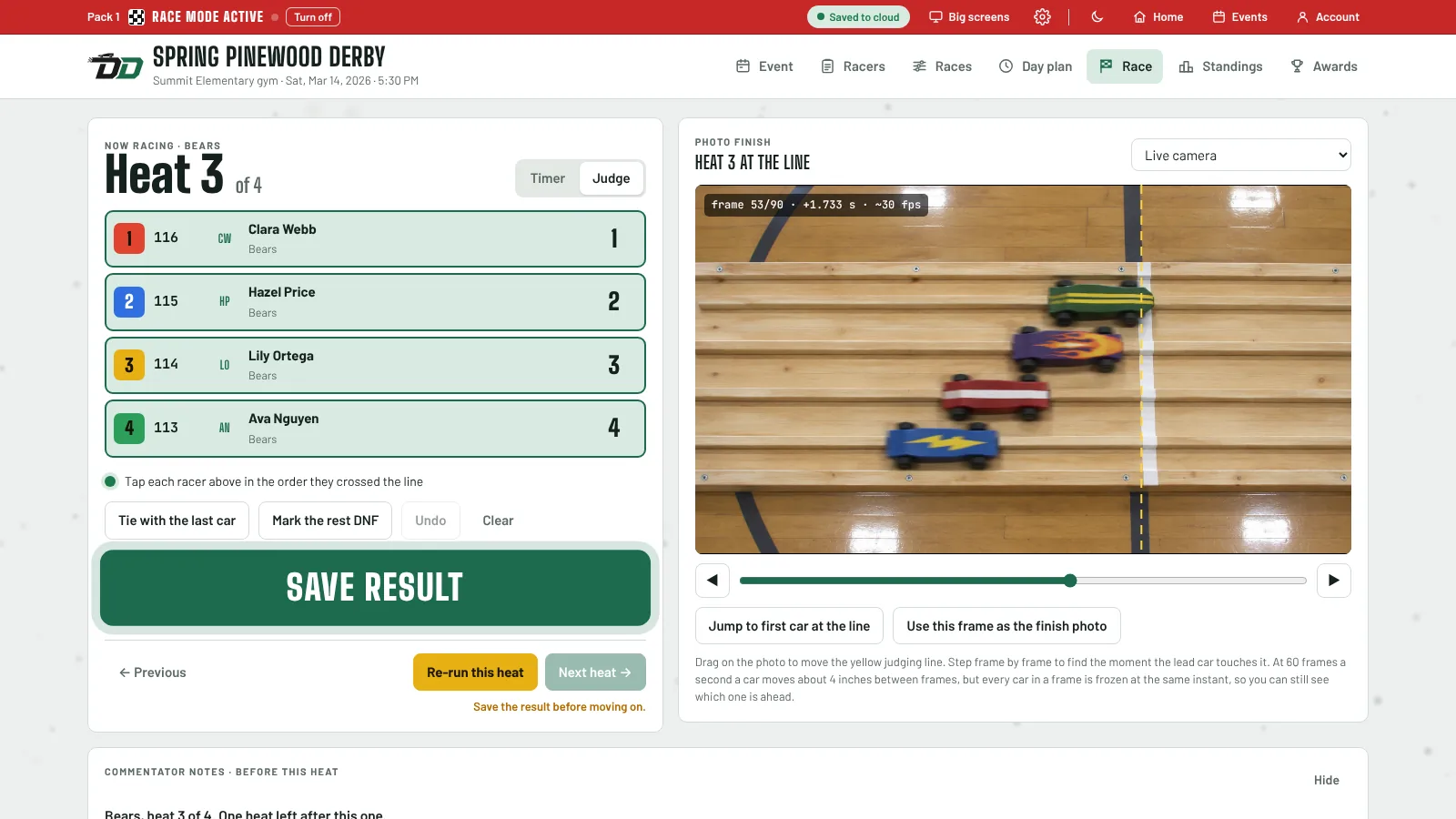
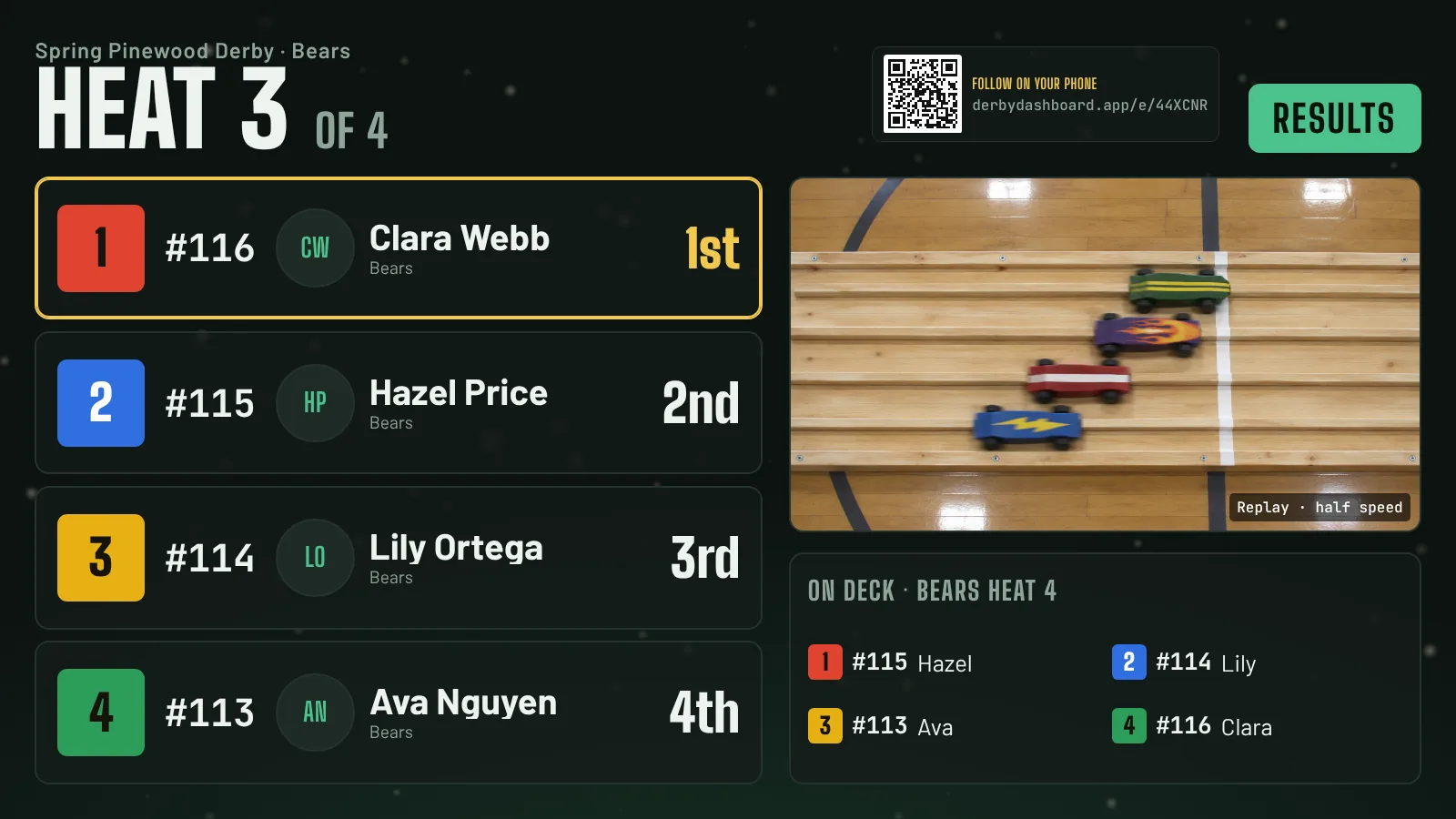
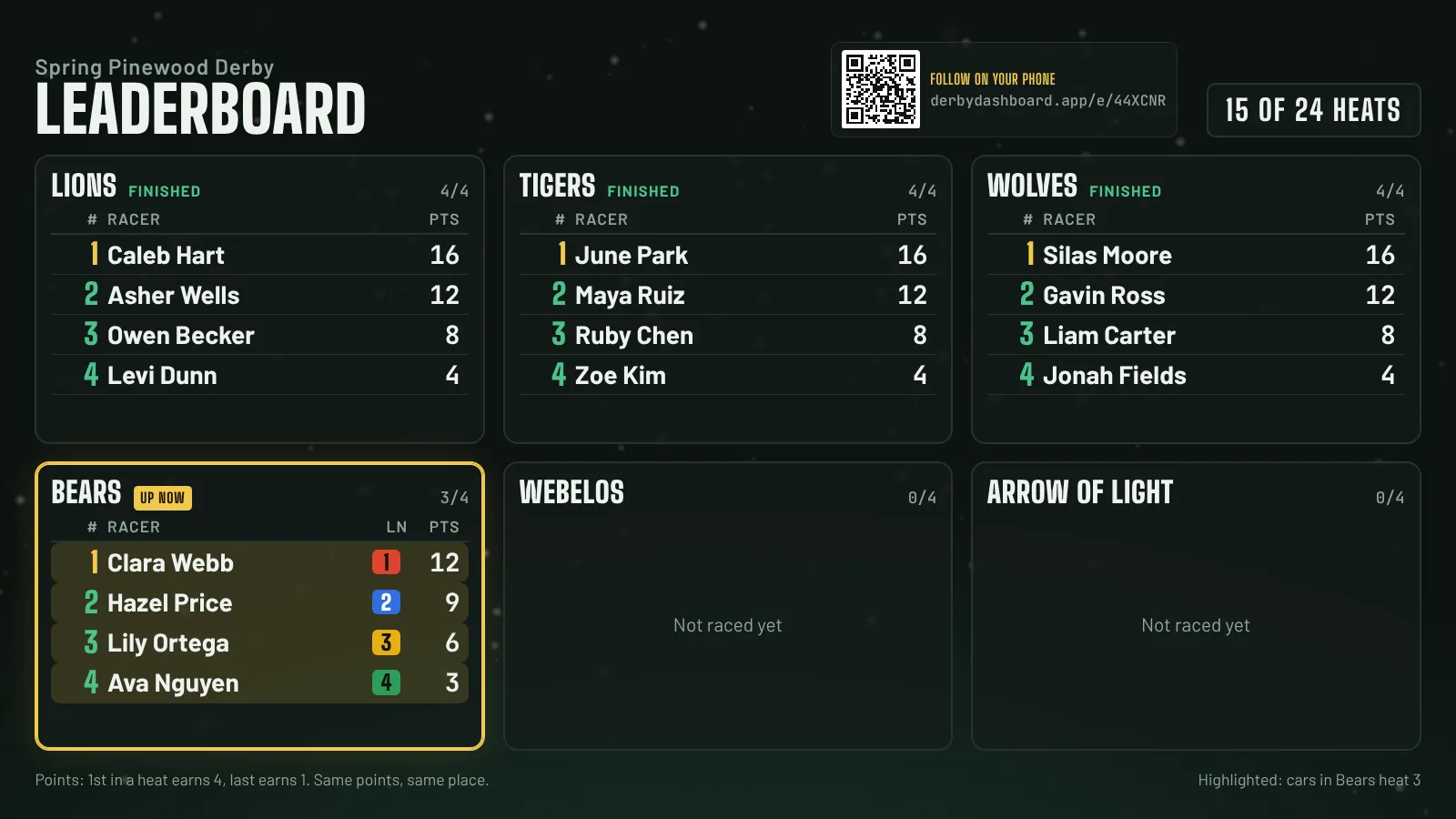
Both screens at once is part of Club Plus; Club shows one at a time. The QR code for parents is part of Club Plus.
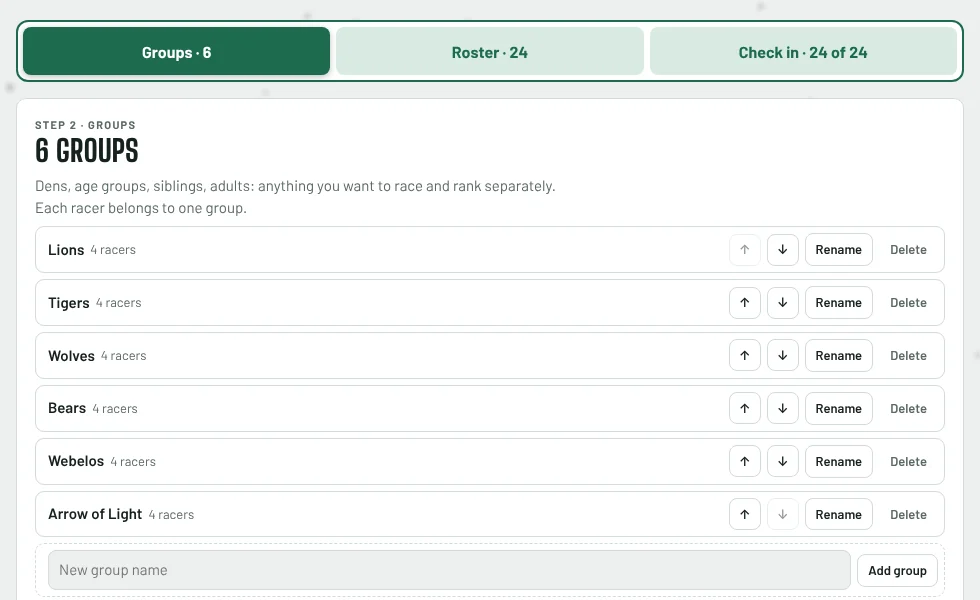
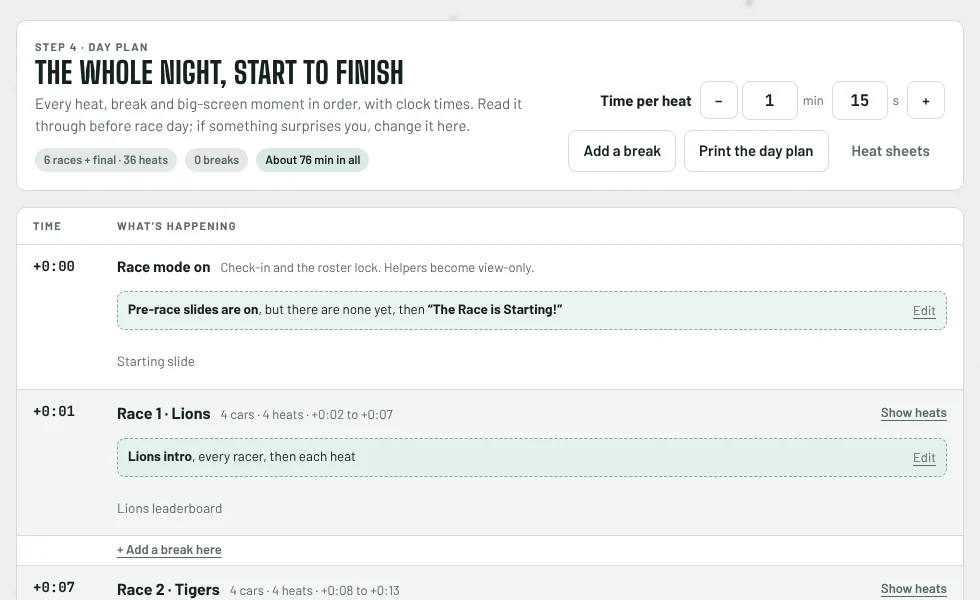
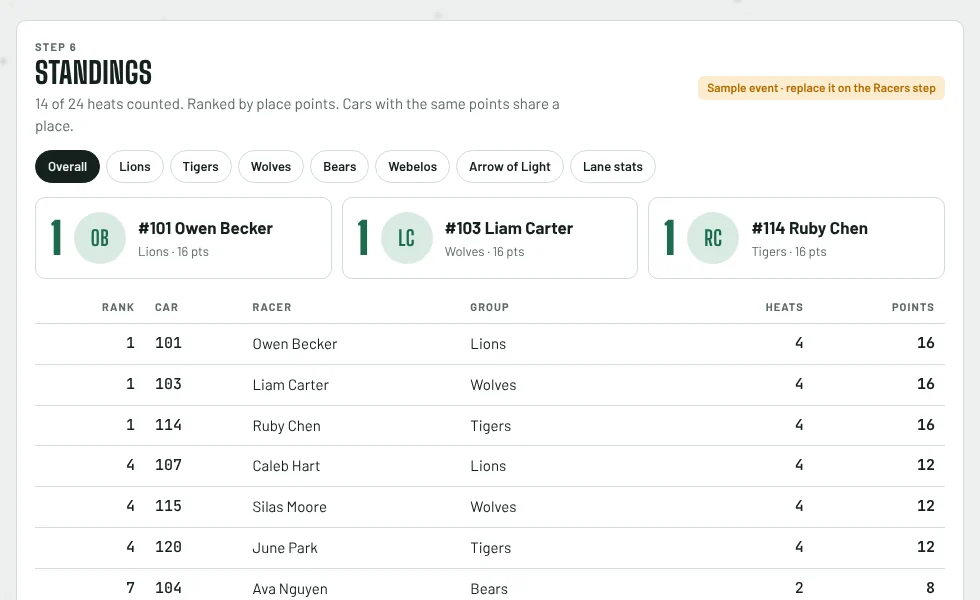
Screenshots show a sample event with made-up racers.
Race day, in order
The app walks you through the day the way it actually happens, so any volunteer can run it.
- RosterAdd racers by den, club or age group, with photos and car names if you like.
- Check inTap each car in as it passes inspection, with the car specs for your kind of race (or your own rules) on screen.
- Race setupChoose who races together and how: every lane, rounds or elimination.
- RaceDrop the gate. A USB track timer saves the heat by itself, or a judge taps the finish order.
- AwardsLock the results and reveal each winner on the big screen.
What it handles for you
The parts that usually need a spreadsheet wizard, a clipboard and a lot of patience.
- Fair heats, automatically
- Every car runs every lane, so no one is stuck on the slow one. Prefer rounds with a cut, round robin, or single or double elimination? Pick it for each den or club.
- Read the timer, settle close calls
- Plug a USB track timer into the laptop and each heat saves itself the moment every car has a time. If a lane's sensor misses, the judge places that car. No timer? A judge taps the finish order, with buttons for ties and cars that don't finish. With a camera at the finish line (paid plans), close calls get a frame-by-frame replay.
- Two big screens
- One shows the current heat, with a camera replay on the paid plans. The other keeps a leaderboard for every den or club up all day, with the cars on the track highlighted (the leaderboard needs the Club plan; both at once is Club Plus). Before the first heat, show up to three welcome slides with a countdown to the start. When the race manager starts race mode, a "The Race is Starting!" slide goes up and check-in and the roster lock, so nothing changes mid-race.
- A schedule to hand out
- Print the heat list or save it as a PDF, with lane colors and a checkbox per heat for your lane volunteers.
- Works without Wi-Fi
- Install it on the race laptop and everything runs offline: racing, big screens, printing and awards.
- Saved in the cloud
- Sign in and your event is saved as you go, ready to open on another laptop if the first one quits mid-race.
Pricing
One price for the year for your pack, club or group, no matter how many of your own races you run.
Free
$0
- Up to 20 racers
- Every race format, with a USB timer or judged by eye
- The current-heat big screen, with a small Derby Dashboard badge
- Schedules and standings
- One person runs it, saved on the race laptop
Club
$49 per year
- Everything in Free
- Unlimited racers
- The leaderboard big screen (one screen at a time)
- Camera instant replay on the big screen
- Printable award certificates
- Ask Orvel, the helper inside the app, about any step
- Saved in the cloud, open on any laptop
- Helpers: race managers with their own sign-in, and check-in helpers with a link and PIN
Club Plus Families
$89 per year
- Everything in Club
- Two big screens at once: the heat and the leaderboard
- Announcements and sponsor messages on the screens
- Online sign-up with your own open and close dates, with photos
- Parents follow along live on their phones on race day, no app needed
- A saved finish-line photo for every heat
Running races for several packs or clubs, like a district or council? Email aaron@derbydashboard.app about a district plan.
Paid plans are paid by card through Stripe, plus sales tax where it applies, and renew each year until you cancel. Not happy? Full refund within 30 days.
New accounts are paused for now, on every plan including Free. Join the waiting list and we'll email you when it's your turn.
Every plan starts with an account. Create one, set up your first race on Free, and move up to a paid plan from the app when you need more. Club and Club Plus aren't for sale yet; we're getting them ready, and Free is open now.
Built for packs, clubs and troops
Whatever your race is called, the day works the same way: cars, lanes, heats and a crowd that wants to see the results.
Guides for race day
From the blog
Join the waiting list
New accounts are opening in stages. Leave your email and we'll write when it's your turn, usually well ahead of race season so you have time to set things up.
We use your email only to tell you about Derby Dashboard. No mailing lists sold or shared. You can ask to be taken off any time.
Questions leaders ask
Do we need to install anything?
No. Derby Dashboard runs in Chrome or Edge on a Windows laptop, a Mac or a Chromebook. You can also install it from the address bar so it opens like an app and keeps working offline.
Does it work without internet?
Yes. Once it's installed on the race laptop, racing, the big screens, printing and awards all run offline. If you're signed in, cloud saving catches up when the connection comes back.
We don't have an electronic timer. Can we still use it?
Yes. A judge taps the finish order for each heat, and the app does the rest: lane rotation, standings and awards. On the Club and Club Plus plans, a camera at the finish line adds a frame-by-frame replay for close calls.
Which track timers does it work with?
Timers that plug into the laptop with a USB cable: FastTrack, The Champ, The Judge, PDT, Derby Timer, Derby Magic, Bert Drake, JIT Racemaster, NewBold and Super Timer II. Plug it in and the app works out which timer it is, then saves each heat as soon as every lane has a time. It needs Chrome or Edge on the race laptop. If yours doesn't answer, send us the log from the timer panel and we'll add it.
How many lanes can our track have?
Anywhere from 2 to 8 lanes. You can set each lane's color to match your track.
What race formats can we run?
Every car runs every lane, round robin, rounds with a cut, and single or double elimination. Score by place points or by fastest average time, and add finals or an overall championship.
Can it run an Awana Grand Prix?
Yes. Set up Cubbies, Sparks and T&T (or any groups you like) as separate races with their own awards, then race the fastest cars in a championship final.
What if the race laptop quits in the middle of the race?
Every change is saved on the laptop as you go. On the paid plans the event is also saved to the cloud, so you can open it on another laptop and keep racing. On the Free plan, save a backup file from Settings before race day.
Can more than one person help run it?
On the Free plan, one person runs everything from the race laptop. On the Club and Club Plus plans, invite race managers with their own sign-in, and share a link and PIN with check-in helpers so they can check cars in from their own phones with no account.
Is our families' information private?
Each pack or club's events and photos are visible only to its own members. Car photos show on the parent page only if your race manager turns them on. A photo a family sends with online sign-up is shown on the screens only if they say it's OK, and owners can delete all of their data at any time.
Is there someone we can ask for help?
Yes. Orvel, our AI helper, answers questions about the app and about running a race. You'll find him in the corner of our website, and on Club and Club Plus he's inside the app too, ready to explain whatever step you're on. He's an AI, so double-check anything important. For a real person, email aaron@derbydashboard.app.
How do we sign up?
Open the app, choose Create account, and enter your email and a password. When new accounts are paused, this page shows a waiting list instead: join it and we'll email you when it's your turn.
How do we pay for Club or Club Plus?
The group's owner pays by card on Stripe's secure checkout, right from the app. Plans are per year, plus sales tax where it applies, and renew automatically until you cancel. You can update your card, get receipts or cancel any time under Manage billing. If you're not happy, email us within 30 days of paying for a full refund.
We run races for several packs or clubs. Is there a district plan?
Yes. Each plan covers one group: a pack, troop, club, school, or one church's own children's programs, and that group can run as many of its own races as it likes. If you're a district, a council, or anyone running races for several groups, email aaron@derbydashboard.app and we'll work out one price for all of them.
Is Derby Dashboard part of Scouting America or Awana?
No. It's independent software, built by someone who has run pinewood derbies himself. It isn't affiliated with or endorsed by Scouting America or Awana Clubs International.